









- Automotive
- Sanding - Polishing
- One sided adhesive tapes
- Packing tapes
- Coloured - marking tapes
- Electrical tapes
- Office tapes, adhesive tapes
- Slick surface tapes
- Metal adhesive tapes
- Masking crepe tape
- Masking special tapes
- Surface protection tapes
- Foam - sealing tapes
- Anti-slip tapes
- Self-adhesive rubber cut-outs
- Special tapes
- Textile tapes
- Warning and reflective tapes
- Double-sided adhesive tapes
- Electrical insulation material
- Glues
- Materials for the production of technical labels
- Flexible stoppers, bumpers
- Velcro straps
- Primers - activators - cleaners
- Accessories for adhesives, applicators
 Monitors
 Laptops
 Desktop and gaming computers
- Accessories and Add-ons
- Backpacks and laptop bags
- Electronic gadgets
- Ergonomic accessories
- External drives
- Gamepads
- Gaming tables
- Gaming chairs
- Microphones
- Internal drives
- Cables
- Office chairs
- Keyboards
- Mice
- Power supplies
- Memory cards
- Mouse pads
- Projectors and accessories
- Mobile phone accessories
- Speakers
- Keyboard and mouse sets
- Headphones
- USB Flash discs
- Gaming steering wheels
- Scales
- Webcams
See how to solve common problems with toners and cartridges
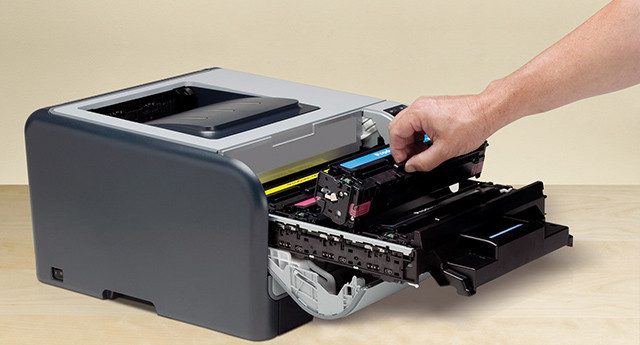
Printers, much like traditional computers, laptops, tablets, or smartphones, provide us with excellent service, but from time to time, larger or smaller problems arise in connection with their operation that need to be addressed immediately. Do you know what the printer is trying to tell you with an error message, or do you remain helpless when there are printing problems? Let's take a look together at some of the most common problems associated with toners and cartridges, as well as possible solutions.

"Printhead Error" Message
Regardless of the printing technology it uses and what printer you own, it is very important that ink cartridges or toners are always in perfect condition.
Even if you choose original or high-quality compatible cartridges from reputable manufacturers, you may quite often encounter the error message "Printhead Error".Through this message, the printer will notify you of problems with the print head. Nothing pleasant, because in inkjet printers the print head is responsible for transferring tiny microdroplets onto the paper through hundreds of nozzles. It is therefore no surprise that the print head is among the most vulnerable components of the printer.
If this message has appeared on your display for the first time, try to resolve the problem by turning off the printer for at least a few minutes. If the problem persists after turning the printer back on, you will have no choice but to try cleaning the print head. And if this attempt of yours is also unsuccessful, you will have to replace the cartridge, which includes the print head.
Of course, not all cartridges offer this option; in the case of some printers, you will have to visit a service center because the print head is permanently built into them. Many more errors or problems are associated with the print head. We can mention, for example, skipped printing, white streaks, blurry prints, incorrect alignment, or poor color interpretation.
The ink cartridge cannot be recognized
The practices of printer manufacturers, and therefore also of original cartridge manufacturers, have not been particularly user-friendly in the past, as they often installed software in their devices to detect non-original cartridges.
Today the situation is somewhat better, and the truth is that more printer manufacturers have started accepting compatible cartridges.Of course, even today it can still happen that the printer is unable to recognize a non-original cartridge. From the customer's perspective, such complications are unpleasant and counterproductive, as they deprive them of the possibility of using more cost-effective ink cartridges or toners from alternative manufacturers. So what can you do? If the printer does not recognize non-original cartridges, you will have no choice but to use original cartridges and, when buying your next printer, give preference to a device that allows compatible ink cartridges or compatible toners.
TIP: Are you considering buying a new printer? Leave nothing to chance, our guide will help you - Choosing a Printer for the Home.
Incorrectly installed cartridge
And finally, we will address another fairly frequent error message. Fortunately, in this case it is not the intention of printer manufacturers, and this problem is associated with other causes. These include a faulty microchip on the cartridge, the expiration of the ink cartridge, or an improper replacement of the ink cartridge, when the microchip does not make contact with the printer and therefore cannot communicate with it properly.
Read also: Have you run out of toner?Which toner should you buy: original or non-original toner?