









- Automotive
- Sanding - Polishing
- One sided adhesive tapes
- Packing tapes
- Coloured - marking tapes
- Electrical tapes
- Office tapes, adhesive tapes
- Slick surface tapes
- Metal adhesive tapes
- Masking crepe tape
- Masking special tapes
- Surface protection tapes
- Foam - sealing tapes
- Anti-slip tapes
- Self-adhesive rubber cut-outs
- Special tapes
- Textile tapes
- Warning and reflective tapes
- Double-sided adhesive tapes
- Electrical insulation material
- Glues
- Materials for the production of technical labels
- Flexible stoppers, bumpers
- Velcro straps
- Primers - activators - cleaners
- Accessories for adhesives, applicators
 Monitors
 Laptops
 Desktop and gaming computers
- Accessories and Add-ons
- Backpacks and laptop bags
- Electronic gadgets
- Ergonomic accessories
- External drives
- Gamepads
- Gaming tables
- Gaming chairs
- Microphones
- Internal drives
- Cables
- Office chairs
- Keyboards
- Mice
- Power supplies
- Memory cards
- Mouse pads
- Projectors and accessories
- Mobile phone accessories
- Speakers
- Keyboard and mouse sets
- Headphones
- USB Flash discs
- Gaming steering wheels
- Scales
- Webcams
What is a print head?
The print head with microscopic nozzles is an important component of inkjet printers, responsible for transferring tiny droplets of ink onto paper. Current print heads commonly have 300 to 400 nozzles. It is therefore no surprise that the print head, given the number of nozzles, is among the most critical or, if you prefer, the “most vulnerable” parts of an inkjet printer.
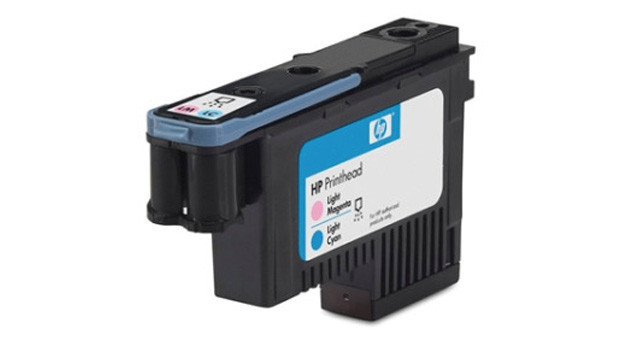
It only takes a few almost invisible grains of dirt or dried ink, and the problem of a clogged print head is here. You are probably very familiar with the following scenario. At first, the printer only occasionally reports an error event. However, the problem more or less repeats itself and worsens until the printer stops printing completely. But before that, you have surely already noticed yourselves that something is not right with the printed text. Printed documents usually contain skipped lines. Before we discuss some of the problems associated with printheads and their possible solutions, let’s take a look at specific types of printheads.
Print head for thermal printing
The print head of a thermal inkjet printer applies ink to paper through nozzles equipped with resistors. The supplied ink is heated by them to approximately 300°C within a tenth of a second and then ejected under pressure onto the paper. The thermal method of applying ink is used primarily by HP, Brother, and Canon printers.
Piezoelectric print heads, like thermal ones, use generated pressure to eject drops of ink. In this case, however, the pressure is not a consequence of high temperature, but is generated by the action of electric current on a piezoelectric element. Under voltage, it "deforms," and the resulting mechanical pressure ejects ink onto the paper through the print head nozzles. Piezoelectric print heads are used in Epson printers.
The most common causes of printhead problems
Poorly printed documents may be caused by the printer's electronics or ink delivery, but the most common reason is the printhead itself.
The problem with this printer component arises when the user does not perform deep head cleaning for a long time or when the frequency of printer use is minimal. Two or three weeks without printing even a test document may be enough for the ink in the print head to dry out. The risk of the ink drying out is even higher when the printer is placed near a heating appliance.It is also necessary to mention the use of unsuitable alternative refills, which may not have an optimal ink composition. The print head with microscopic nozzles may therefore have a problem with the density of alternative cartridges. The result may be not only blurry and poor-quality printing, but also a damaged print head. Using original cartridges therefore seems to be the safest way to prevent potential problems with the print head.
Dried print head – what to do?
The best prevention to keep the print head in good condition, i.e. how to prevent ink from drying out is regular printing. If, for some reason, the ink has nevertheless dried out, you have no choice but to try cleaning the print head.First, try running the “Print Head Cleaning” mode on the printer. The name of this function may vary, so please read the user manual to use it.
If you are unable to do so even after repeatedly starting the mode, it will be necessary to replace the cartridge and therefore also the print head. Of course, this is only possible with ink cartridges that have an integrated print head. This option is particularly applicable to HP printers.
It will be more complicated with the print heads in Epson printers, where these components are permanently built into the device. You will probably not avoid a visit from a service technician or replacing the print head as a separate spare part. In Canon printers, the print head is located in the device, but removing it is not the slightest problem. So you can also try, for example, dissolving dried ink in a shallow dish with heated distilled water, or use a special printhead cleaning solution.