









- Automotive
- Sanding - Polishing
- One sided adhesive tapes
- Packing tapes
- Coloured - marking tapes
- Electrical tapes
- Office tapes, adhesive tapes
- Slick surface tapes
- Metal adhesive tapes
- Masking crepe tape
- Masking special tapes
- Surface protection tapes
- Foam - sealing tapes
- Anti-slip tapes
- Self-adhesive rubber cut-outs
- Special tapes
- Textile tapes
- Warning and reflective tapes
- Double-sided adhesive tapes
- Electrical insulation material
- Glues
- Materials for the production of technical labels
- Flexible stoppers, bumpers
- Velcro straps
- Primers - activators - cleaners
- Accessories for adhesives, applicators
 Monitors
 Laptops
 Desktop and gaming computers
- Accessories and Add-ons
- Backpacks and laptop bags
- Electronic gadgets
- Ergonomic accessories
- External drives
- Gamepads
- Gaming tables
- Gaming chairs
- Microphones
- Internal drives
- Cables
- Office chairs
- Keyboards
- Mice
- Power supplies
- Memory cards
- Mouse pads
- Projectors and accessories
- Mobile phone accessories
- Speakers
- Keyboard and mouse sets
- Headphones
- USB Flash discs
- Gaming steering wheels
- Scales
- Webcams
Pocket printers for travel – a hit that appealed especially to young people
Among pocket-sized, or if you prefer portable, printers, we find small devices that are capable of high-quality label or receipt printing without any compromises. These devices are of course useful, but uninteresting to young people. A much more attractive alternative to pocket printers are devices that allow you to print photos anywhere in the field.

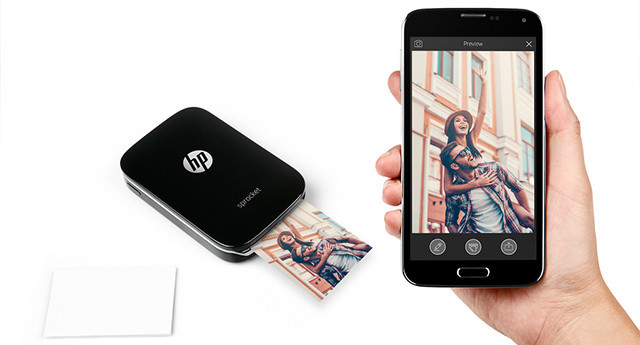
More versatile use, excellent image quality
A common feature of all pocket printers is mobility, which is available thanks to a battery that allows the device to operate without an electrical outlet. If we add to that the aforementioned ability to print photos, compact dimensions, surprisingly good image quality, and more versatile use than what we would get from a Polaroid, it is no wonder that pocket printers enjoy enormous popularity among young people.
However, recent trends show that even the "older" generations cannot resist the charm of printed photographs. Pocket printers are therefore increasingly being used to print photographs from family vacations, celebrations, and various social events. So what else, besides the mentioned benefits, have pocket printers managed to use to attract the attention of young people?
TIP: Do you prefer printed photos? We will advise you which printer to choose for printing photos.
Pleasant dimensions, easy to use
Pocket printers are generally small, compact devices that can be conveniently taken anywhere while traveling. So that it doesn’t remain just words, we will offer you a look at the dimensions of the popular HP Sprocket pocket printer. You will agree that dimensions of 116 x 75 x 23 mm really do not take up much space, and you will not be any worse off in terms of weight either. It represents a negligible 170 grams.
The nice thing about the pocket printer is that it offers easy use. Before you start using the pocket printer, you must first install the mobile application on your smartphone. But there is no need for concern; it is nothing complicated. The application is of course available for the Android platform as well as for other operating systems. After installing the application, you can connect to the pocket printer via Bluetooth. And this is precisely how we arrived at the above-mentioned versatility of pocket printers.
With a Polaroid-type camera, you do get the photo you just took right away, but that’s about all. With a pocket printer, however, it is something completely different. The printer can be connected to from a tablet or even from multiple mobile phones. In the app environment, you then select images from your device gallery that you would like to have in your photo album, or connect to social networks using your smartphone and choose photos for printing from Facebook or Instagram. And you don't have to print only finished photos. At a family celebration, you can take a picture using your mobile phone’s built-in camera and, within a few minutes, hold in your hand a photograph printed by a pocket printer. Photographs can of course be edited before printing.
Simple image editing, quick printing without refill
If you are not satisfied with the enclosed image, no problem. The application offers several tools for editing photographs. This way, you can adjust the color saturation or brightness of a photograph, and edits that give the resulting images the appearance of old photographs are nothing unusual either. Young people will certainly appreciate adding various clipart, text, or frames.
The pocket printer is also interesting in that the photo printer does not require toners or ink cartridges. Photos are printed on special ZINK photo paper, which is inserted into a tray located under the lid of the pocket printer.
ZINK Photo Paper features all the color shades needed to print color photos. The printer, in our case the HP Sprocket, uses ZINK thermal printing technology (the printing technology name is derived from the words Zero Ink, so ZINK means WITHOUT INK) to heat the photo paper, on which a color photograph is then created. But don't be fooled. The entire process is relatively quick, and no more than 30 seconds pass from clicking the printer icon to printing the image.
Pocket printers can be a perfect gift
If you don't know what to give your children, consider a pocket printer. Pocket printers will be an excellent companion for them, and your reward may be printed photographs capturing unique moments from their adventurous expeditions, which you will proudly display at home or at work.
TIP: Do you know how to choose photo paper for your printer so that the image quality is satisfactory?