









- Automotive
- Sanding - Polishing
- One sided adhesive tapes
- Packing tapes
- Coloured - marking tapes
- Electrical tapes
- Office tapes, adhesive tapes
- Slick surface tapes
- Metal adhesive tapes
- Masking crepe tape
- Masking special tapes
- Surface protection tapes
- Foam - sealing tapes
- Anti-slip tapes
- Self-adhesive rubber cut-outs
- Special tapes
- Textile tapes
- Warning and reflective tapes
- Double-sided adhesive tapes
- Electrical insulation material
- Glues
- Materials for the production of technical labels
- Flexible stoppers, bumpers
- Velcro straps
- Primers - activators - cleaners
- Accessories for adhesives, applicators
 Monitors
 Laptops
 Desktop and gaming computers
- Accessories and Add-ons
- Backpacks and laptop bags
- Electronic gadgets
- Ergonomic accessories
- External drives
- Gamepads
- Gaming chairs
- Microphones
- Internal drives
- Cables
- Office chairs
- Keyboards
- Mice
- Power supplies
- Memory cards
- Mouse pads
- Projectors and accessories
- Mobile phone accessories
- Speakers
- Keyboard and mouse sets
- Headphones
- USB Flash discs
- Gaming steering wheels
- Scales
- Webcams
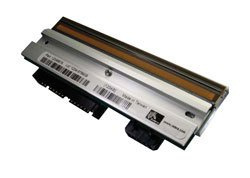
Zebra G105910-148 printhead TLP2824, 8 dots/mm (203dpi)
Parameters
Product description
Ensure trouble-free and long-term operation of your label printer with the original Zebra G105910-148 printhead. This key component, also referred to as the TLP2824, is designed to provide sharp and precise prints with a resolution of 203 dpi (8 dots per millimeter). As specialists in solutions for logistics, warehousing, and retail, we know that print quality is essential for code readability and the professional appearance of labels. This printhead is fully compatible with a range of Zebra printer models and ensures reliable heat transfer to label material, eliminating common issues such as blurred text, blank labels, or uneven color shades.
When selecting a spare part, the most important thing is an exact match with your existing device. The G105910-148 printhead is specifically designed for printers with a resolution of 203 dpi. If your printer operates at a higher resolution, such as 300 dpi, this part will not function and may cause damage to the device. Therefore, it is always recommended to verify the printhead type in the printer settings or in the user manual before installation. Using original accessories from the manufacturer Zebra guarantees maximum compatibility, optimal service life, and preservation of your printing device's warranty conditions. Investing in a quality replacement printhead is the cheapest way to restore your printer’s full functionality and avoid costly repairs or the need to purchase a new device.
- Original replacement part from Zebra
- Print resolution: 203 dpi (8 dots/mm)
- Printhead type: TLP2824
- Product code: G105910-148
- Designed for label printers with both thermal transfer and direct thermal printing
- Ensures sharp and legible printing of codes and text
- Easy replacement without the need for special tools
Installing a new printhead is a process that any user with minimal technical knowledge can handle.
Just turn off the printer, unplug it from the power supply, and after opening the cover, carefully remove the old printhead and replace it with a new one. We recommend using a clean cloth when handling and avoiding touching the sensitive contacts to prevent damage. After installation, it is advisable to print a test page, which will confirm proper functionality and print quality. This way, you will keep your printing processes smooth and efficient, without unnecessary downtime and label readability issues. Reliability and print quality are the pillars of the successful operation of any business, which is why it is important to choose only proven and original parts that meet the highest manufacturing standards.


