









- Automotive
- Sanding - Polishing
- One sided adhesive tapes
- Packing tapes
- Coloured - marking tapes
- Electrical tapes
- Office tapes, adhesive tapes
- Slick surface tapes
- Metal adhesive tapes
- Masking crepe tape
- Masking special tapes
- Surface protection tapes
- Foam - sealing tapes
- Anti-slip tapes
- Self-adhesive rubber cut-outs
- Special tapes
- Textile tapes
- Warning and reflective tapes
- Double-sided adhesive tapes
- Electrical insulation material
- Glues
- Materials for the production of technical labels
- Flexible stoppers, bumpers
- Velcro straps
- Primers - activators - cleaners
- Accessories for adhesives, applicators
 Monitors
 Laptops
 Desktop and gaming computers
- Accessories and Add-ons
- Backpacks and laptop bags
- Electronic gadgets
- Ergonomic accessories
- External drives
- Gamepads
- Gaming tables
- Gaming chairs
- Microphones
- Internal drives
- Cables
- Office chairs
- Keyboards
- Mice
- Power supplies
- Memory cards
- Mouse pads
- Projectors and accessories
- Mobile phone accessories
- Speakers
- Keyboard and mouse sets
- Headphones
- USB Flash discs
- Gaming steering wheels
- Scales
- Webcams
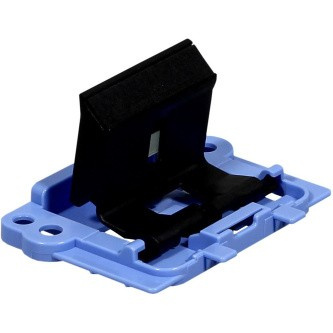
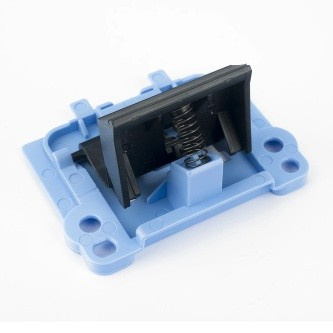
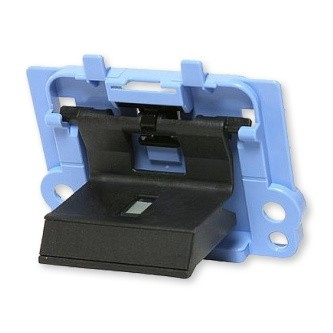
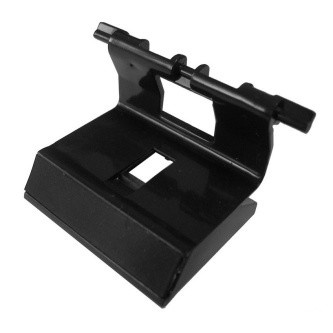
HP original separation pad RM1-4006, RM2-5131, HP LaserJet P1102, separation pad
Parameters
Product description
When operating an HP laser printer or multifunction printer, you know that reliable paper feeding is essential for a smooth workflow. A common cause of errors such as multiple sheets feeding at once or paper jams is a worn separation pad. The original HP RM1-4006 replacement part (also referred to as RM2-5131) is designed to permanently resolve this issue and restore your device’s original feed quality.
This special component is located in the feed mechanism and plays a vital role in separating individual sheets. While the feed roller draws the paper toward the print head, the separation pad ensures that only one sheet enters the printer at a time. If the pad is clogged with dust, worn out, or has lost its grip, the printer may not properly distinguish between individual sheets, resulting in feeding errors. Replacing it with a new genuine HP part is the fastest and most effective way to restore the feeder to proper working order.
Using original HP manufacturer replacement parts guarantees full compatibility and a long service life. These parts are tested in accordance with strict quality standards to match the printer's original condition. Unlike non-genuine alternatives, which may have different material properties or dimensions, the genuine RM1-4006 pad fits precisely into the mechanism and ensures an optimal friction coefficient for reliable feeding.
Key product features:- Genuine HP part: Ensures maximum compatibility and reliability in Hewlett-Packard devices.
- Feeding error resolution: Effectively eliminates multi-feed and paper jam issues.
- Wide compatibility: Suitable for a range of HP laser printer and multifunction printer models, including the popular LaserJet Pro and Enterprise series.
- Easy replacement: The replacement part is designed for easy installation without the need for special tools, saving time and service costs.
- Long service life: Made from high-quality materials that withstand normal wear and tear from everyday printing.
This separation pad is suitable for a wide range of HP laser printer and multifunction printer models. Supported devices include, for example, HP LaserJet P1005, P1006, P1007, P1008, P1009, HP LaserJet Pro P1100, P1102, P1102w, P1106, P1108, P1109, HP LaserJet Pro M12a, M12w, M1130, M1132, M1136, HP LaserJet Pro MFP M125nw, M126a, M126nw, M127fs, M127fw, M127fn, M26a, M26nw, HP LaserJet M1210, M1212nf, M1213nf, M1214nfh, M1216nfh, M1217nfw, and HP LaserJet Enterprise M1139 and M1219nf. Before installation, always verify that this specific part is listed among the compatible models for your printer.
Replacing the separator pad is a simple task that you can do yourself. Simply open the printer’s front cover, where the feed mechanism is located, carefully remove the old pad, and install the new one in its place. After closing the cover, the printer is ready for further operation. This step will not only resolve current paper feed issues, but also extend the life of the entire feed system and ensure uninterrupted work without unexpected downtime.
