









- Automotive
- Sanding - Polishing
- One sided adhesive tapes
- Packing tapes
- Coloured - marking tapes
- Electrical tapes
- Office tapes, adhesive tapes
- Slick surface tapes
- Metal adhesive tapes
- Masking crepe tape
- Masking special tapes
- Surface protection tapes
- Foam - sealing tapes
- Anti-slip tapes
- Self-adhesive rubber cut-outs
- Special tapes
- Textile tapes
- Warning and reflective tapes
- Double-sided adhesive tapes
- Electrical insulation material
- Glues
- Materials for the production of technical labels
- Flexible stoppers, bumpers
- Velcro straps
- Primers - activators - cleaners
- Accessories for adhesives, applicators
 Monitors
 Laptops
 Desktop and gaming computers
- Accessories and Add-ons
- Backpacks and laptop bags
- Electronic gadgets
- Ergonomic accessories
- External drives
- Gamepads
- Gaming tables
- Gaming chairs
- Microphones
- Internal drives
- Cables
- Office chairs
- Keyboards
- Mice
- Power supplies
- Memory cards
- Mouse pads
- Projectors and accessories
- Mobile phone accessories
- Speakers
- Keyboard and mouse sets
- Headphones
- USB Flash discs
- Gaming steering wheels
- Scales
- Webcams
4 reasons why you need a Wi-Fi printer at home
If you are currently asking yourself which printer you should get for your study or office, we have one tip for you. You should consider a printer with a Wi-Fi connection feature. Why should you choose this particular printer? The answer is simple. There are several good reasons why it is worth investing in this type of printer. Read on and in the following lines we will show you up to 5 reasons why a Wi-Fi printer is the right choice.

A few words of introduction
Wireless networks and mutual wireless communication between devices are nothing new. At present, this is already a long-term trend that is applied in practice not only in office spaces, but is also increasingly used in ordinary households. The days when laptops or traditional desktop computers were essentially the only devices that could be connected to the internet wirelessly or paired with other devices in this way are long gone.
In addition to the aforementioned laptops, mobile phones, game consoles, devices for streaming music and video, and various audio-video equipment are also equipped with wireless technology today. And in addition to the above-mentioned devices, the aforementioned printers and multifunction devices naturally also use wireless technology. The Wi-Fi module is therefore part of many printer models, offering the possibility of quick connection or pairing of various devices and, ultimately, unparalleled printing convenience.
The disadvantages of this technology essentially do not exist. Perhaps the only weaker aspect of a Wi-Fi connection is the security of such printing, which is, however, fairly well protected by the WPA 2 encryption protocol. The WPA 2 encryption standard minimizes any potential threat of compromising secure print protection. But let’s return to the Wi-Fi printer and look at the specific reasons you should consider when buying a new printer.
Cut the cords and print from anywhere in your home
If you are bothered by the multitude of ever-present cables that feet often get tangled in, posing not only the risk of damaging the cable or knocking a laptop off the table, but even causing a person to fall, then you will certainly appreciate the option of connecting your printer to your computer wirelessly.
A Wi-Fi printer is also an excellent choice when you want to print text documents or photos from anywhere in your home. You don't have to be near the Wi-Fi printer. From the comfort of every room in the house, you can instruct this device to carry out a print job. It's simple. Simply select the specific print job and confirm the selection.
You can submit print jobs not only from a laptop
If you want to print from a mobile device, then with a conventional printer without a Wi‑Fi module, you must first send the document to your laptop or desktop computer and only then issue the print command.
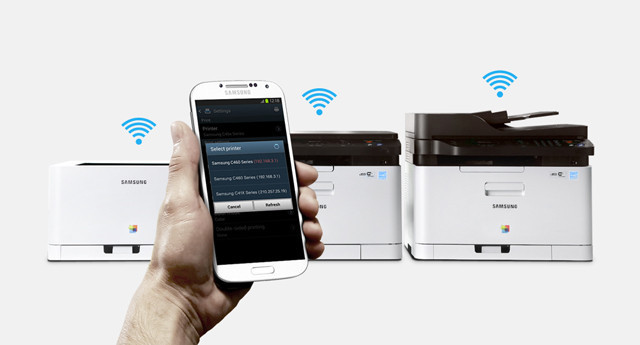
With a Wi-Fi printer, you can skip this procedure entirely, because you can send the print job directly from a tablet or smartphone to this printer.In addition, after downloading the application to your smartphone, issuing a print command can be done, so to speak, with a single touch. So you can hold the requested printed document in your hands in record time.Another advantage of a Wi-Fi printer lies in the simplicity of installation
Manufacturers of Wi-Fi printers go out of their way to accommodate their customers and simplify the installation of these devices as much as possible within the limits.
A Wi-Fi printer therefore does not connect to a computer, but directly to the local Wi-Fi network, where after connecting it serves as a network device for other connected devices from which print jobs can then be submitted. If your local network is password-protected, you will need to find the password and network information to install the Wi-Fi printer. Of course, if necessary, you can also connect the Wi-Fi printer to your laptop using a USB cable.Multifunction printers and Wi-Fi
And finally, we have arrived at the last reason that you should also consider when choosing a printer. And that is the fact that the Wi‑Fi module is often placed by printer manufacturers in more expensive multifunction printers. Thanks to these devices, you can copy, scan, or send documents via email.
Using a Wi-Fi printer, you can print text or graphic documents in a very convenient way (without using cables). Of course, only provided that your printer has sufficient ink or high-quality toner.