









Printers
Label makers and label printers
Adhesives
- One sided adhesive tapes
- Packing tapes
- Coloured - marking tapes
- Electrical tapes
- Office tapes, adhesive tapes
- Slick surface tapes
- Metal adhesive tapes
- Masking crepe tape
- Masking special tapes
- Surface protection tapes
- Foam - sealing tapes
- Anti-slip tapes
- Self-adhesive rubber cut-outs
- Special tapes
- Textile tapes
- Warning and reflective tapes
- Double-sided adhesive tapes
- Electrical insulation material
- Glues
- Flexible stoppers, bumpers
- Velcro straps
- Primers - activators - cleaners
- Accessories for adhesives, applicators
Learn the simple basics of color management
Color management may be an uninteresting topic for you, and even a completely unfamiliar term if you do not care about the appearance of downloaded color images or are satisfied with less accurate color reproduction in printed working materials.
However, probably anyone who keeps up with the times even a little and uses a computer, camera, or printer at least to a minimal extent has certainly encountered color management at some point. And you will surely agree with us that the issue of faithful color reproduction may be complicated for the average user of various devices, but it is generally useful and irreplaceable.

What is color management?
Different devices (monitors, printers, cameras) have different color gamut capture and display capabilities. Therefore, colors on individual devices may appear more saturated or, conversely, less vivid, and the final result may differ to a greater or lesser extent from the original source or the captured reality.
Color management is therefore a solution that, although it has its limitations and cannot completely eliminate color inaccuracies, at least comes close to the most faithful display of the final print. Therefore, in color management it is essential to use supporting software, ICC profiles, standard color spaces, device profiling, and calibration. So what could you try to make the colors on the monitor match those on paper?
Monitor calibration and profiling
The absolute priority must be to achieve the most accurate color display possible on your monitor. If colors are being distorted on the monitor, among other things, it may lead you to edit your photos. These may look impressive on your monitor, but they will look completely different when printed.
You can achieve the best and most accurate color rendering even on a standard monitor by creating your own ICC profile. You can perform profiling using purchased software with a calibration probe. This profiling works by having the software display known colors step by step while the probe measures their actual rendering. Based on this test, the created profile will automatically become part of the device's operating system.
Another option is hardware calibration. This calibration, after connecting to the monitor via the USB interface, will not only perform optimal adjustment of the monitor hardware itself, but will also ensure profiling, creation of an ICC profile, and its saving to the device system. The resulting color display is therefore more accurate and there is no reduction in the number of displayable colors.
Printer profiling
When using original cartridges, special profiling is usually not necessary, and using the manufacturer's profile is usually sufficient.
However, if you still had to profile the printer, the procedure is similar to that for a monitor. The difference is that this profiling device will need to have a light source in order to measure the colors printed on paper for creating an ICC profile.Primarily use the sRGB color space
For common home or office use, this color space working with three primary colors is the most suitable. The sRGB color space is a standard accepted not only by devices, but also by software. In addition, sRGB is best suited to monitors, covers most real-world colors, and is the typical color space in which many digital devices, including cameras, store images.
The wider Adobe RGB color space does cover more colors, especially in the green and cyan areas, but using this space requires more professional knowledge. The average user will therefore make greater use of the standard sRGB color space.
TIP: Read more information about sRGB on Wiki.
RGB and CMYK Conversion
Because different devices do not use the same percentage coverage of the standard color space (gamut), it will sometimes be necessary to adjust colors so that a larger gamut fits into a smaller one. Simply put, a monitor has one gamut and a printer another, so a vivid red color on a monitor may not be as vivid when printed on a printer, or vice versa. Rich red on paper will be interpreted as less vivid on a monitor.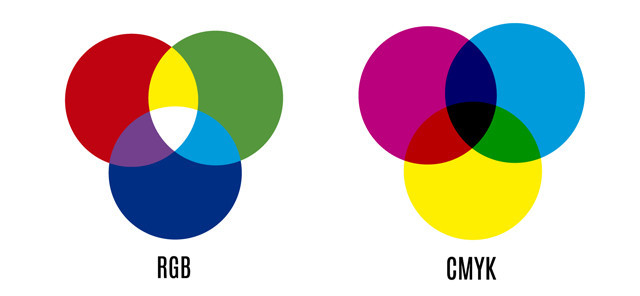
The reason for the different rendering in our case is the difference between the gamuts of the sRGB monitor and the CMYK printer. Therefore, their recalculation will be necessary, which can be carried out in Adobe software. You can use four methods to do this, which will refine the displayed colors more or less effectively. This is the absolute colorimetric, relative colorimetric, or perceptual method, and the saturation method, which, however, is not suitable, for example, for editing photographs.
Master the simpler adjustments first
There are many color spaces, software programs, ICC profiles, and various conversions. It is no wonder that color management is a rather complex process for many. For normal use of the device, simpler color adjustments and the use of the sRGB color space, which generally guarantees acceptable color display accuracy, will be sufficient for you. As your requirements gradually increase, you can move to full color management.