









- Automotive
- Sanding - Polishing
- One sided adhesive tapes
- Packing tapes
- Coloured - marking tapes
- Electrical tapes
- Office tapes, adhesive tapes
- Slick surface tapes
- Metal adhesive tapes
- Masking crepe tape
- Masking special tapes
- Surface protection tapes
- Foam - sealing tapes
- Anti-slip tapes
- Self-adhesive rubber cut-outs
- Special tapes
- Textile tapes
- Warning and reflective tapes
- Double-sided adhesive tapes
- Electrical insulation material
- Glues
- Materials for the production of technical labels
- Flexible stoppers, bumpers
- Velcro straps
- Primers - activators - cleaners
- Accessories for adhesives, applicators
 Monitors
 Laptops
 Desktop and gaming computers
 Accessories and Add-ons
- Backpacks and laptop bags
- Electronic gadgets
- Ergonomic accessories
- External drives
- Gamepads
- Gaming chairs
- Microphones
- Internal drives
- Cables
- Office chairs
- Keyboards
- Mice
- Power supplies
- Memory cards
- Mouse pads
- Projectors and accessories
- Mobile phone accessories
- Speakers
- Keyboard and mouse sets
- Headphones
- USB Flash discs
- Gaming steering wheels
- Scales
- Webcams
Document cameras
Epson Visualizers – Project Documents, Objects, and Even the Smallest Details
Visualizers for Epson projectors, also known as document cameras, let you display printed documents, photographs, books, and three-dimensional objects on a large projection screen.
They are a practical aid, especially for school lessons, professional training, corporate presentations, or demonstrations. Thanks to digital image capture, presenters can conveniently display content directly from their desk without having to scan it beforehand or prepare it in electronic form.
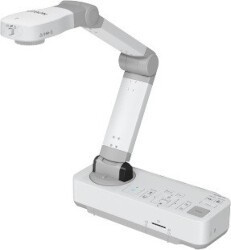


How do Epson visualizers work?
Epson visualizer uses a camera mounted on an adjustable arm to capture documents and objects beneath it. The image can then be transmitted to a compatible Epson projector or another supported display device. Teachers can thus show the entire class textbook pages, detailed illustrations, laboratory equipment, or the process of solving problems in real time.
Selected models also support digital or optical zoom, autofocus, and integrated LED lighting, which makes it easier to see even small details.
Practical use in teaching and presentations
Epson document cameras are useful wherever content needs to be clearly presented to a larger audience. Unlike standard presentations, they allow you to work directly with physical materials and respond immediately to the flow of the presentation.
- Classroom teaching – projecting textbooks, worksheets, pictures, maps, or handwritten notes.
- Specialized training – visual demonstrations of work procedures, components, and small objects.
- Corporate presentations – sharing printed materials, documents, and product samples.
- Practical demonstrations – detailed presentation of objects and demonstration experiments for a larger audience.
Advanced features for detailed viewing
Epson’s range includes compact portable visualisers as well as desktop document cameras with more advanced features. Depending on the specific model, they may offer Full HD or 4K resolution, optical or digital zoom, autofocus, illumination of the area being captured, or a freeze-frame function.
The individual variants also differ in their connectivity options. In addition to models that use USB, visualizers with HDMI output are available, and selected devices also support wireless image transmission. With compatible models, the image can also be processed using a connected notebook and the appropriate software.
How to choose the right Epson visualizer?
When choosing a visualizer for an Epson projector, we recommend considering above all the required resolution, image magnification capabilities, the size of the area to be captured, and the available connectors. For everyday document presentations, a simpler portable model may be sufficient, while for detailed demonstrations and frequent use, you’ll appreciate the advanced features of desktop visualizers.
Epson document cameras make it easy to share real objects and printed materials, helping make presentations clearer without complicated preparation. When selecting a specific device, it is advisable to check its compatibility with the projector in use and the features required for everyday use.